Registration System FAQs
Blossom Foundation introduced a new registration system for Sri M’s programs, beginning with the Spring 2026 programs at Sacred Grove – Center for Yogic Studies and Exploring Consciousness (CYSEC) – in Graham, TX. This FAQ provides detailed answers to help you navigate the system with ease.
Every participant must first create a Blossom Foundation user profile. Without a completed profile, retreat, lodge, or volunteer registration will not be possible.
Create/ Access your Blossom Foundation profile link here.
Why this change?
Our system provides:
A smoother registration and check-in experience.
One unified process to book multiple retreats and register family members – all in a single checkout, making the process more efficient.
Seamless integration with our on-campus registration system for a consistent experience from registration through arrival.
Easy login, password recovery, and profile management for future registrations.
Family profiles to manage your spouse, partner, or children under one account – linked across all retreat seasons.
Friend connections for the current retreat season when attending together.
Simple cancellation and refund options.
The ability to register if spots open through cancellation.
General
Why did Blossom Foundation introduce a new registration system?
Our system is designed to make it easier, safer, and more efficient for you to register for retreats, lodging, and volunteer opportunities at Sacred Grove. It offers a unified checkout process, seamless integration with our on-campus registration system, and easy cancellation and refund management – all from one account.
Do I need to create a profile to register?
Participants who already have a verified profile do not need to create a new one; simply log in with your existing email and password to register for the Fall 2026 programs.
Those who do not have a verified Blossom Foundation profile, can create it here. Without a completed and fully verified profile, you will not be able to register for retreats, lodging, or volunteering.
What devices can I use to access the system?
You can use a phone, tablet, laptop, or desktop computer to access the registration system.
When do retreat registrations open?
Retreat registrations open on August 8, 2026. We recommend creating your profile and adding family members before that date so you are ready to register as soon as registration opens.
User Profiles
Before you begin profile creation and ID verification
Have your valid government-issued ID ready and ensure your profile name exactly matches the name on that ID.
Make sure your camera works properly and your internet connection is stable before starting ID verification.
Use a well-lit space with good light on your face, keep the camera steady, and stay still while your photo is taken.
Avoid using your phone’s flash when photographing your ID. The flash can make the content of your ID unreadable. Use a well-lit area with ample light, and ensure that all text and the image are clear and legible before submitting.
If you are using a passport, photograph the entire passport photo/identity page, including the two lines of machine-readable text at the bottom of the page (the Machine Readable Zone, or MRZ). This information is used to complete your ID verification process. Make sure the full page is visible, clear, readable, and not cut off, covered, or obscured by glare.
This process will take under 5 minutes. Please complete this process in one session. If you do not have your ID or time to complete in one session, please start the process when you have the required information and time.
If you leave the process without completing after you have started ID verification, the system may prevent a successful verification and profile creation.
When should I complete my profile? Can I create my profile when I am ready to register for a program?
You may create your profile at any time, we strongly recommend completing it well in advance of registration opening. Your profile must be completed and approved before you can register for any program, and you will need your physical ID in hand to complete the verification step.
What information do I need to create my profile?
You will need to provide your full name, phone number, date of birth, gender (M/F), and email ID. You will also be asked to provide an emergency contact, indicate whether you have taken Kriya from Sri M, and attest to your eligibility to volunteer.
How is my identity verified?
Your full name and email ID are validated. A third-party ID verification is required to complete your profile.
What forms of ID are accepted for verification?
Any one of the following valid IDs is accepted:
US or foreign passport
US driver’s license
US state ID card
US permanent resident card
Other IDs issued by the US government
Passport users: Please include the complete photo/identity page, including the two lines of machine-readable text at the bottom.
What should I do if my ID verification goes into manual review or my status does not update?
If the system indicates that your ID verification is under manual review, please discontinue further attempts and allow 24 hours for the review to complete.
Starting multiple new verification sessions during this period may disrupt the system and prevent successful verification.
Once verification is complete, your profile may not immediately display the correct status when you log in.
If this occurs, please log in using an incognito or private browser window to view the updated status.
Is my personal data safe?
Yes. All personal data is encrypted and stored securely. Payment information is processed and stored by a 3rd Party Payment Processor (e.g. Stripe); not by Blossom Foundation.
I am only interested in attending a retreat, then why is my volunteer eligibility checked at the time of profile creation?
Several attendees offer to volunteer on days between retreats once they arrive at Sacred Grove. Capturing your volunteer eligibility as part of your profile helps us get you onboard as a volunteer more quickly.
How do I log in after creating my profile?
Once your profile is fully verified, you can log in using your email ID and a strong password. Forgot and reset password options are available if needed.
What do I do if I forget my password?
Go to the Blossom Foundation website and select Sign In. Enter the email address associated with your profile, then click “Forgot Password.” A “Reset Password” window will appear. Enter your email address, and a link to reset your password will be sent to you. Please check both your inbox and spam or junk folder for the email.
Can I update my profile information later?
Your first name, last name (as per your verified ID), and date of birth are locked once your profile is verified and cannot be changed. You can manage and update any remaining information on your profile after logging in to your account.
Family and Friends
Adding a Spouse or Partner:
How do I add my spouse or partner to my account?
Enter your spouse's or partner's email ID. The system will check if they already have an approved profile. If they do, a verification email will be sent to them asking for confirmation. If they do not yet have an approved profile, the system will prompt them to create one first.
How long does my spouse or partner have to confirm?
They must confirm within 48 hours. After that, the verification link expires and you will need to submit the request again. Until they confirm, their status will show as "Pending confirmation."
Do family connections carry over to future retreat seasons?
Yes. Family (spouse, partner, and children) remain linked to your account across all retreat seasons. You do not need to re-add them each season.
Adding Children or Dependents:
How do I add a child or dependent?
You can add a child of any age by entering their name and date of birth.
Can both parents add the same child?
Yes. Both parents can add the same child to their respective Family profiles.
Are there age requirements for children to attend retreats?
Yes. During registration, the system will automatically verify that each child meets the minimum age requirement for the specific program.
Do children qualify for reduced fees?
The retreat fee is the same for all registered participants who meet the eligibility criteria. Anyone attending the retreat as a participant, including children who are eligible to register, are required to pay the full retreat fee.

Adding Friends:
How do I add a friend to my profile?
You can add a friend by entering their email ID. The process is similar to adding a spouse or partner – the friend must have an approved profile and will receive a verification email to confirm the connection within 48 hours.
How long does a friend connection last?
Friend connections are valid only for the current retreat season. You will need to re-add friends for future seasons.
Retreat Registration
Who can register for retreats?
All users with fully verified profiles are eligible to register for retreats, provided seats are available.
Can I register for my family members?
Yes. You can register individually or as a family. When registering as a family, you can select or deselect any family member for each retreat. The system will verify that each child meets the minimum age requirement for the specific program.
Can I register a family member for a retreat without registering myself?
No. If you register for someone that is included in your family/friend profile for a retreat, you must also register yourself for that same retreat.
For example, if Spouse A wants to register Spouse B and a child to attend, they cannot do this without registering themselves. Spouse B should register both themselves and the child from Spouse B’s Blossom Foundation user profile.
Can I register for multiple retreats at once?
Yes. You can select multiple retreats and complete payment in a single checkout. For each retreat, you can add family members or friends (up to 4 spots per retreat). However, only one Kriya retreat per season is allowed per person – the system enforces this for both adults and eligible children.
What happens at checkout?
Before checkout, you will need to review and e-sign the terms and conditions for each retreat. When you click "Pay Now," the system checks availability in real time:
If spots are available, your payment is processed.
If any product is no longer available, you will see a message indicating which retreat is sold out. You can remove that item from your cart and proceed to purchase the remaining retreats.
What confirmation will I receive?
After you successfully register for a retreat, a confirmation email will be sent immediately to the email address associated with your Blossom Foundation profile. You will also receive a copy of the e-signed terms and conditions.
You can also log in to your Blossom Foundation profile, navigate to “My Registrations” to see the details of the retreats that you registered for and, if applicable, any lodge bookings associated with your registration.
How do I add a family member or friend after I have already registered?
If you have already registered and would like to add a family member or friend, first add them to your profile. Then go to the “My Registrations” tab and select “Register Family/Friend” under your retreat booking.
A drop-down menu will appear with the family members or friends you have added to your profile. Select the names you would like to register for the same retreat, then complete the registration and payment.
What if a retreat is sold out?
If all spots are sold out, the retreat will display as "Sold out". You may be able to register later if spots open through cancellations (see Registration Against Cancellations below).
Do you reserve spots or maintain a waitlist?
No. We do not reserve spots in advance, nor do we maintain a waitlist. All registrations are confirmed strictly on a first-come, first-served basis until capacity is reached.
If a retreat is sold out, we will announce the date and time when any spots that become available due to cancellations will be open for registration.
What payment methods are accepted?
Payments are powered by a 3rd Party Payment Processor (e.g. Stripe), which supports all major payment methods. All payment information is stored by a 3rd Party Payment Processor; not by Blossom Foundation. You will see a full cost breakdown by product and quantity before confirming payment, and a payment confirmation email will be sent to you.
Lodge Registration
Lodge registration is managed through the Blossom Foundation registration system and can be selected in your Blossom Foundation profile after your retreat registration is confirmed as an attendee or volunteer.
What dates are available for lodge stays?
The system will automatically display relevant dates based on your retreat registration – from one day before your first retreat starts to one day after your last retreat ends. Your lodge booking must include all days of each retreat you are registered for – partial retreat days cannot be booked separately.
Can I change my lodge stay dates?
Yes, you can extend or shorten your lodge booking by up to one day before or after your retreat, as long as it stays within retreat guidelines. To do so, go to “Manage Lodge Booking”, click on “Edit Dates” and change your dates. The system will automatically recalculate the payment difference and charge / refund the appropriate balance.
Can I book a lodge stay for specific family members only?
Yes. You can select which registered family members or friends to include in the lodge booking for each retreat. Use the “Edit Guest” feature to add a family member to your existing lodge booking.
Can I book a lodge stay with a friend?
Yes. If you have added a friend to your profile, you can purchase a lodge stay together with that friend. You can also use the “Edit Guest” feature to add a same-gender friend to your existing lodge booking.
Can I book a lodge with my child?
Yes. When you book lodging for yourself and a child, both are paired to stay together automatically. For families with two adults and two children, the system pairs one parent and one child per lodge.
Can a retreat attendee book a lodge with a friend or family member who is volunteering?
No. Our current registration system does not allow shared lodge bookings between retreat attendees and volunteers. Each group must book lodging separately based on their registration type.
How does room assignment work?
Roommates of the same gender are factored in when booking, with a maximum of 2 guests per lodge room (except for single occupancy rooms). Guests under 18 must be accompanied by an adult.
How much does the lodge cost?
Lodge pricing is as follows:

The system will display the per-night cost and the overall cost based on the number of participants and the number of nights selected.
Can I Change from single to double occupancy?
If you originally booked a lodge as single occupancy and later another registered participant (for example, your spouse or a same-gender friend) wishes to share your room, please first add that participant to your profile. Then you can update your booking to double occupancy. To do so, go to “Manage Lodge Booking” → “Edit Guest” and add the family member or friend to your lodge booking. The system will automatically recalculate the payment difference and charge the appropriate balance.
Are there terms and conditions for the lodge?
Yes. After selecting your lodge dates and before payment, you will be asked to review and e-sign the lodge terms and conditions. A confirmation email with your lodge registration and terms and conditions will be sent to you.
What if I have a lodging question not covered here?
For specific scenarios not addressed in this FAQ, please email bflodging@blossomfoundation.com or visit the Blossom Foundation Lodge FAQs page.
Cancellations and Refunds
Can I cancel my registration?
Yes. You can cancel registrations for any or all retreats for yourself, your family members, or children that you booked for. You also have the option to cancel for "All" participants on a booking at once.
How do I cancel a retreat registration?
Cancellations must be submitted directly through your Blossom Foundation profile.
Log in, navigate to My Registrations, and follow the prompts to cancel.
You may cancel for yourself, for family members or friends linked to your account.
For a solo registration, the primary registrant may cancel their own registration.
For group registrations, the primary registrant may:
Cancel their entire booking—their own registration and all linked family members or friends by selecting “Cancel Registration.”
Cancel only a linked family member or friend while keeping their own registration active by clicking the “X” next to that person’s name.
Please note that the primary registrant cannot cancel their own registration while keeping any linked family members or friends registered.
Please review the Fall 2026 Retreats page for cancellation cutoff dates and refund eligibility for each program. Refunds can take up to 7 business days and will be processed only to the same payment card used for the original payment. Your bank or card provider may take additional time to reflect the refund in your account.
What happens to my lodge booking if I cancel a retreat?
If you cancel a retreat registration, the associated lodge booking will also be automatically canceled. A message will be displayed during the retreat cancellation process to inform you of this.
Cancelling a retreat registration will automatically cancel the associated lodge reservation for the same participant(s).
If you cancel the retreat for everyone on your reservation, the lodge reservation for everyone in that booking will also be cancelled.
If you cancel only a linked family member’s or friend’s retreat registration, only that person’s associated lodge reservation will be cancelled. Your own retreat registration and lodge reservation will remain active, along with those of any other participants who remain registered.
Any applicable lodge refund will be issued according to the refund policy on our lodge registration page.
A message will be displayed during the retreat cancellation process to inform you of this.
Am I eligible for a refund?
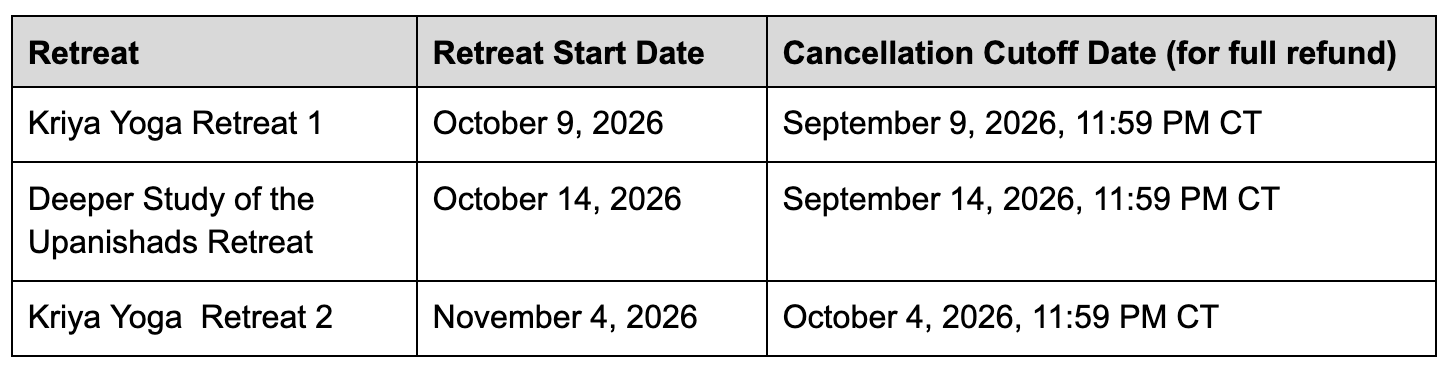
Refund eligibility depends on the specific product and the timing of your cancellation. 100% refund for cancellations per “Cancellation Cutoff Dates” up to 11:59pm CT shown in table below. The system will display your total refund amount (or indicate that no refund applies) and ask you to confirm before the cancellation is processed.
How will I know my cancellation is confirmed?
You will receive a cancellation confirmation email.
What happens to the spots I cancel?
Retreat registrations are non-transferable. If Blossom Foundation decides to reopen any canceled spots for registration, we will announce the date and time on WhatsApp, our website, and by email to our subscribers, with at least 48 hours notice.
Registration Against Cancellations
What is registration against cancellations?
If a retreat is sold out and spots later become available due to cancellations, those spots are offered as a separate registration opportunity. This allows you to register for a retreat that was previously full.
When do these spots become available?
Registration against cancellations opens on a set date after the cancellation cutoff has passed. The number of available spots equals the number of cancellations received for that retreat.
How do I register for these spots?
You register the same way you would for any retreat: you must have a fully verified Blossom Foundation profile, then you select the retreat (if spots are available), review and e-sign the terms, and complete payment through a 3rd Party Payment Processor. (Identity verification is completed during profile creation)
What is the refund policy for registration against cancellations?
You will have a 24-hour refund window after booking a spot through registration against cancellations. Beyond 24 hours, these purchases are non-refundable.
Volunteer Registration
Who is eligible to volunteer?
Volunteers must be a US Citizen, or a Legal Permanent Resident (Green Card holder), or an Employment Authorization Document (EAD) holder. You must have a fully verified Blossom Foundation profile and answer "Yes" to the volunteer eligibility question during profile creation.
Can I volunteer as a family?
All adults can register to volunteer individually. Parents can select their children to volunteer along with them at the time of registration.
Can I volunteer for multiple retreats?
Yes. You can register to volunteer for multiple retreats, including multiple Kriya retreats, as well as pre-retreat and post-retreat days.
What information is collected during volunteer registration?
In addition to the information already in your profile (name, email, phone, emergency contact, gender), the volunteer registration will ask for:
Which retreats/days you would like to volunteer for (including pre-retreat and post-retreat days).
Your prior volunteering experience (at Blossom Foundation, at other nonprofits, or first time).
Whether you have completed a Yoga Teachers Training Course.
Your volunteer task preference (you may select any or all): Lodge; Kitchen; Dining; Parking (must have own or rented vehicle); Registration and Merchandise Sales; Cleaning and Sustainability; Pots and Pans, Dishes, and Laundry; or "Sign me up for any task."
Are there additional requirements for volunteers under 18?
Yes. Volunteers under the age of 18 must also provide a parent/guardian name and email. The parent/guardian must be on campus at the same time as the volunteer, either as a registered volunteer or attendee.
What happens after I submit my volunteer application?
You will receive an acknowledgment email confirming receipt of your application. You will need to review and e-sign the terms and conditions before your application is complete. At a later date:
If approved, you will receive a volunteer confirmation email that includes a link to register for the lodge.
If not selected, you will receive a notification email informing you of the outcome.
Need Help?
Tech Tip: Please make sure that you have cleared your browser cache. If any issues persist while creating your profile or updating your account/ registration, please login to your account in a new Incognito mode browser window.
If you have any further questions about the registration system, please refer to the Quick Start Guide or email programs@blossomfoundation.com